
Global Setting For All Grid Trade

This section contains settings that apply to all grid trades, regardless of whether they are part of the loss side or profit side grid strategy.
Any input listed here will affect both types of grid trades, making it easier to manage global behavior such as drawdown reduction or shared trade conditions across the EA.
What is Grid DD Reduction?
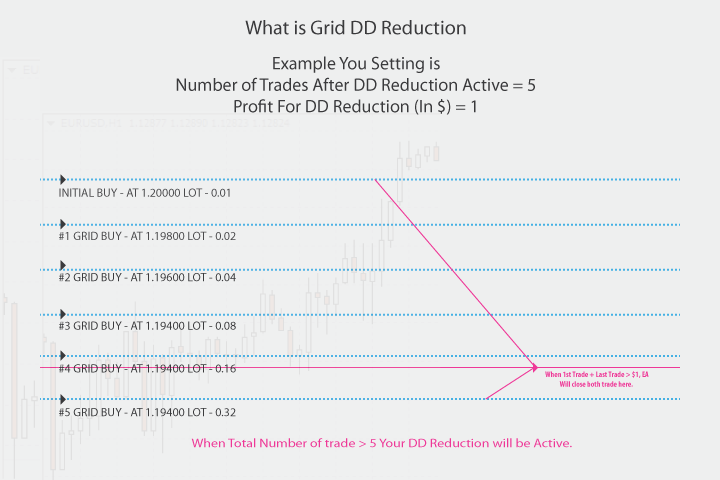 Grid Drawdown Reduction (Grid DD Reduction) is a technique used in grid trading systems to manage risk and reduce the overall drawdown of open trades. In a traditional grid setup, as the market trends in a losing direction, the EA (Expert Advisor) keeps adding trades, making it harder to reach the take-profit (TP) target for the entire grid because the average TP level is pushed further away from the current price.The Grid DD Reduction strategy works by selectively closing the oldest losing trade and the latest winning trade when their combined profit reaches a small threshold (like $1). This partial closing helps reduce the total number of open grid trades while gradually locking in profits, even in a challenging trending market.Benefits of Grid DD Reduction:
- Lower Drawdown: By closing pairs of trades as profit is available, the overall exposure is reduced, which helps lower drawdown.
- Fewer Open Trades: Reduces the total number of open trades, making it easier to manage risk and allocate margin.
- Gradual Profit Taking: Allows for incremental profit-taking in a grid system, helping to maintain account stability during unfavorable trends. This method can improve the sustainability of a grid trading system by balancing profit-taking with risk control.
How to use Grid DD Reduction:
- Grid DD Reduction (Active/De-Active): Enables or disables the Grid Drawdown Reduction feature. Set to "True" to activate and "False" to deactivate. Number of Trades to Activate DD Reduction: Specifies the number of total trades required to trigger DD Reduction. When the total number of trades reaches this value, the EA will start closing trades in pairs (first trade + last trade) if their combined profit is greater than or equal to the Profit for DD Reduction amount.
- Number of Trades to Deactivate DD Reduction: When DD Reduction is active, the EA will continue closing trades by pairing (first trade + last trade) as long as their combined profit meets the Profit for DD Reduction threshold. This process continues until the total number of trades reaches this specified value. At that point, DD Reduction will stop, and the EA will revert to its standard closing method (e.g., using TP/SL). Example: If Number of Trades to Activate DD Reduction is set to 10 and Number of Trades to Deactivate DD Reduction is set to 4, DD Reduction will activate when there are 10 trades and continue until there are 4 trades left, after which normal closing rules apply.
- Profit for DD Reduction (in $): Sets the minimum profit amount, in currency, required to close the first and last trade pair when DD Reduction is active.
Don't Trade if Grid Trade Already Exists:
These settings help prevent the EA from opening any new grid trades when any type of grid trade is already active within a defined price zone.
The EA considers all grid trades, regardless of:
Grid type: Loss Grid or Profit Grid
Trade direction: Buy or Sell initial trade
Grid source: Grid opened from Buy initial trade or Sell initial trade
If any grid trade exists within the defined zone, the EA will block opening new grid trades, even if the signal comes from:
Buy → Loss Grid
Buy → Profit Grid
Sell → Loss Grid
Sell → Profit Grid
🧠 How It Works
When
DontTradeIfGridTradeExist = true, the EA checks for any existing grid trade before opening a new one.This check applies to all grid trades opened by the EA with the same Symbol and MagicNumber.
The EA creates a price zone around the current market price using:
Your configured Grid GAP
Plus ExtraPaddingForGridZone (%)
If any grid trade (buy/sell, loss/profit) is found inside this zone, the EA will not open a new grid trade.
📌 Example
Current Price: 1.20000
Grid GAP: 200 points
ExtraPaddingForGridZone: 30%
Total Grid Zone =
200 + 30% = 260 points
EA checks the zone:
1.19740 to 1.20260
If any grid trade exists inside this range:
Buy Loss Grid
Buy Profit Grid
Sell Loss Grid
Sell Profit Grid
👉 No new grid trade will be opened

