
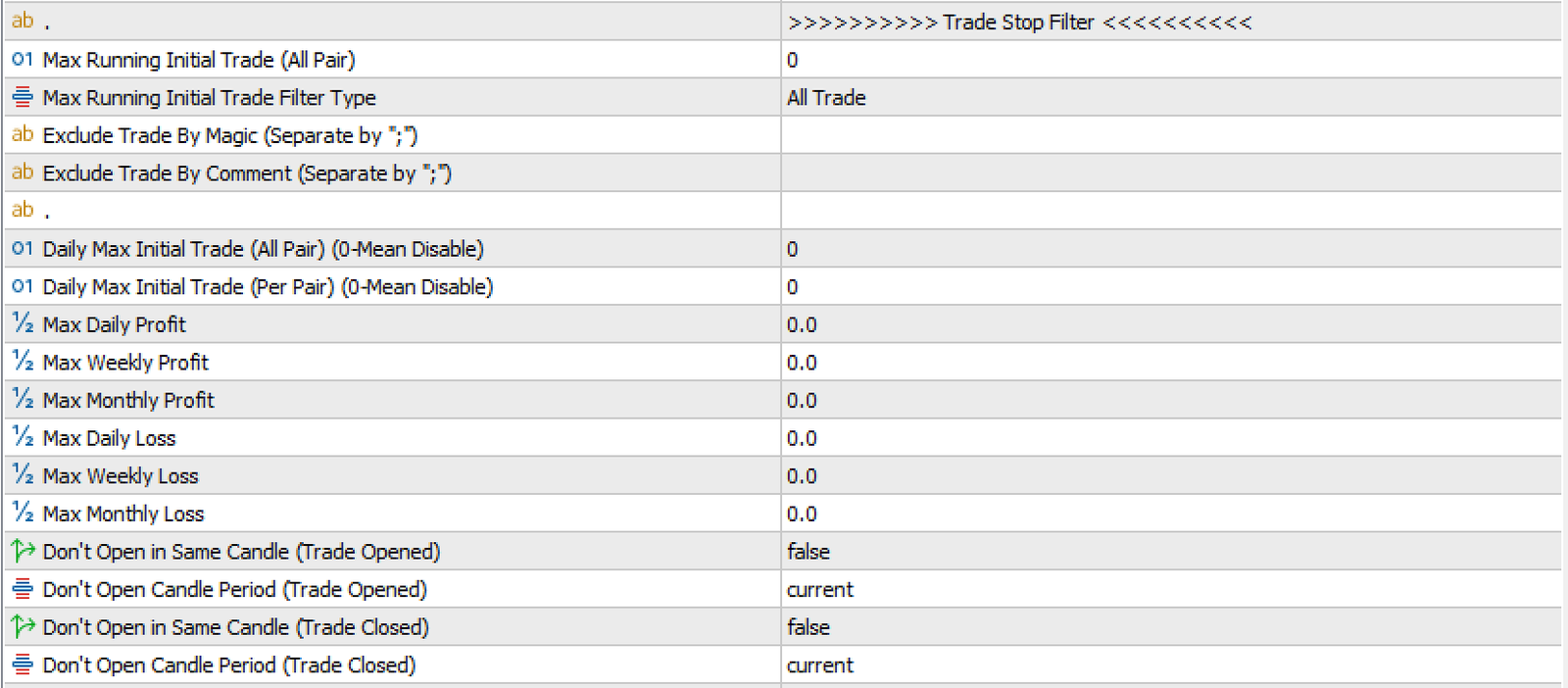
The Trade Stop Filter section allows you to manage and restrict the opening of new initial trades based on specific conditions. These filters help control profit and loss probabilities and limit the number of trades opened by the EA. Keep in mind that this section applies only to initial trades, not to grid trades.
Types of Trade Stop Filters

1. For Running Trades:
- Max Running Initial Trade (All Pair): Controls the maximum number of initial trades running simultaneously across all pairs when multi-pair trading is active.
- Example: If trading EURUSD, GBPUSD, and AUDUSD with Max Running Initial Trade (All Pair) = 2, the EA will limit the total active trades to 2 across all pairs.
- Max Running Initial Trade Filter Type:
Defines how the EA identifies trades for the running trade limit. Options include:- All Trade: Considers all trades regardless of magic number or comment.
- Same MagicNumber: Considers only trades with the same magic number as specified in the Common Section.
- Same Comment: Considers only trades with the same comment as specified in the Common Section.
- MagicNumber (First 3 Digits): This setting allows filtering of trades based on the first three digits of the MagicNumber.
Example: If you are running three EAs with the following MagicNumbers:
EA 1: 23423410
EA 2: 23423411
EA 3: 23423412
Although the MagicNumbers are different, the first three digits (234) are the same. The EA will recognize these three EAs as part of the same group, and if one EA opens a trade, the others will be restricted from opening new initial trades. This ensures better trade management when running multiple instances of the EA on different charts while preventing over-trading across strategies.
- Exclude Trade By Magic / By Comment (Separate by ";"): These settings allow you to exclude specific trades from being counted in the Max Running Initial Trade (All Pair) logic. This helps when you are running multiple EAs and want to ignore some of them when applying the stop filter.
🧠 How It Works
When the EA counts the number of currently running Initial Trades (based on the selected Filter Type), it will ignore trades that match either:
Magic Numbers listed in Exclude Trade By Magic
Comments listed in Exclude Trade By Commet
📝 Exclude by Magic Number: If you want to exclude specific Magic Numbers, simply list them separated by ;.
📌 Example: ExcludeTradeByMagic = "2222;3333"
This will ignore any trades opened by Magic Number 2222 or 3333.
📝 Exclude by Comment (Smart Match): This input checks the trade comment of each open trade and matches based on partial text (not exact match). It is case-insensitive and works on contains logic.
📌 Example: ExcludeTradeByComment = "global trade;ma ea"
This will exclude any trade whose comment includes either:
global trade→ matchesGlobal Trade EA,My global trade bot, etc.
ma ea→ matchesSmart MA EA,ma ea settings, etc.
You do not need to write the full comment. Any partial matching string will be filtered.
2. For When There Are No Open Trades:
- Daily Max Initial Trade (All Pair) (0-Mean Disable): Limits the maximum number of initial trades opened in a single day across all pairs.
- Example: If Daily Max Initial Trade (All Pair) = 2, the EA will stop opening new initial trades for the day once two trades are opened.
- Daily Max Initial Trade (Per Pair) (0-Mean Disable): Limits the number of initial trades opened per pair in a single day.
- Max Daily Profit: Stops trading when a specified profit target is reached in a single day.
- Example: If Max Daily Profit = $100, the EA will stop trading for the day once $100 profit is achieved.
- Max Weekly Profit: Stops trading when a weekly profit target is reached.
- Example: If Max Weekly Profit = $500, the EA will stop trading for the week once $500 profit is achieved.
- Max Monthly Profit: Stops trading when a monthly profit target is reached.
- Example: If Max Monthly Profit = $1000, the EA will stop trading for the month once $1000 profit is achieved.
- Max Daily Loss, Max Weekly Loss, Max Monthly Loss: Similar to the profit limits but applied to losses. For example, if Max Daily Loss = $50, the EA will stop trading for the day once a $50 loss is reached.
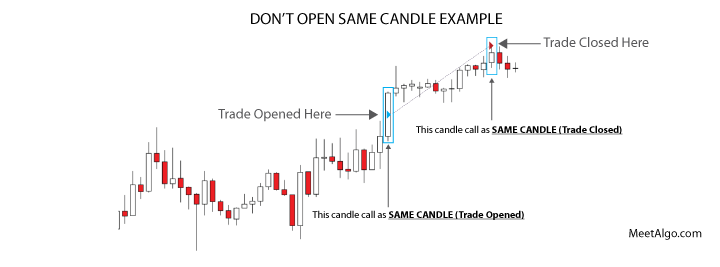
- Don't Open in Same Candle (Trade Opened): Prevents the EA from opening another initial trade in the same candle where a trade was already opened.
- Example: If a trade is opened and closed within the same candle, the EA will not open a new trade until the next candle.
- Don't Open Candle Period (Trade Opened): Specifies the timeframe to define the "same candle" for the above filter.
- Example: If set to H4, the EA considers the current H4 candle as the "same candle."
- Don't Open in Same Candle (Trade Closed): Prevents the EA from opening another initial trade in the same candle where a trade was closed.
- Example: If a trade closes after several candles, the EA will not open a new trade in that same closing candle.
- Don't Open Candle Period (Trade Closed): Specifies the timeframe to define the "same candle" for the above filter.
- Example: If set to H4, the EA considers the current H4 candle as the "same candle."
KEEP IN MIND - This section only stops to open initial trade only. This filter will not work on Grid trade.

