
MeetAlgo provides optimized setting files for many Expert Advisors (EAs). These files are generated using extensive strategy testing and optimization.
A setting file contains a predefined configuration of EA parameters that can be loaded directly into MetaTrader. This allows traders to quickly test or run an EA using parameters discovered during optimization.
Setting files are provided as research examples. Traders may use them directly or further optimize them according to their broker, market conditions, and risk preferences.
What is Included in the Download Package
Each setting file download comes as a compressed ZIP folder.
Example file name:
After extracting the ZIP file, the folder typically contains:
1. Strategy Tester Report (HTML)
Example file:
Double-click this file to open it in your browser.
The report shows:
- Expert Advisor used
- Trading symbol (pair)
- Timeframe
- Testing period
- Deposit used
- Profit
- Drawdown
- Number of trades
- Profit factor
It allows you to review the backtest performance before using the setting file.
2. Strategy Graph Images
The folder may include several images such as:
These images show additional information including:
- Equity curve
- Trade distribution
- Profit statistics
- Maximum favorable / adverse excursion
These charts help traders analyze the strategy behavior.
3. EA Setting Files
The folder contains parameter configuration files for MetaTrader.
Example:
Sometimes the folder may contain:
Important note:
Some settings are designed specifically for MT5 and may not work correctly in MT4.
If the folder does not contain an MT4 setting file, it means:
The configuration supports MT5 only.
Step-by-Step: Using the Setting File in Strategy Tester
Follow the steps below to test the setting file.
Step 1 — Download the Setting File
Go to:
https://meetalgo.com/tools/setting-file/
Find the desired configuration and click the Download button.
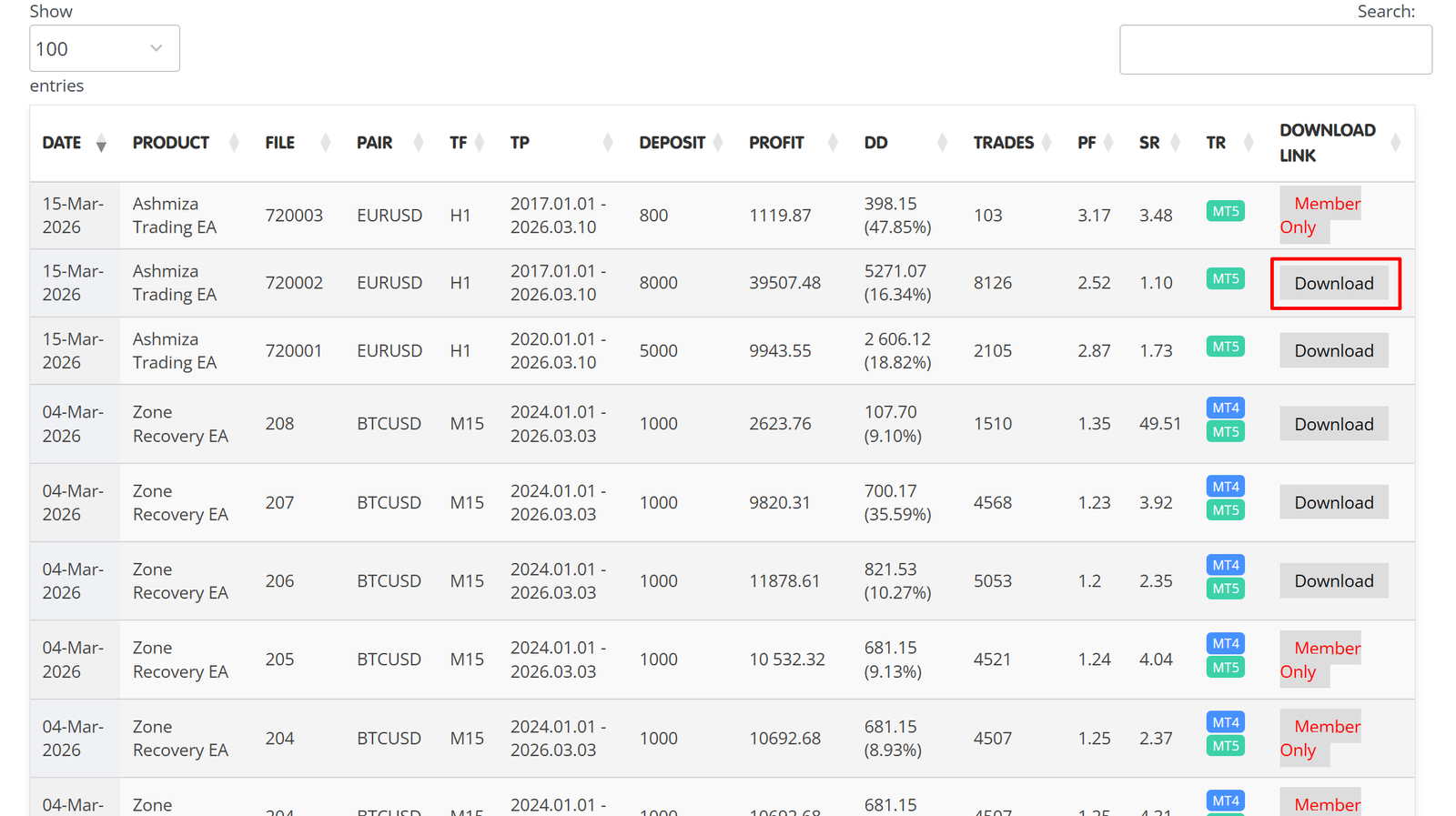
Step 2 — Extract the ZIP File
After downloading:
-
Right-click the ZIP file
-
Click Extract All
-
Open the extracted folder
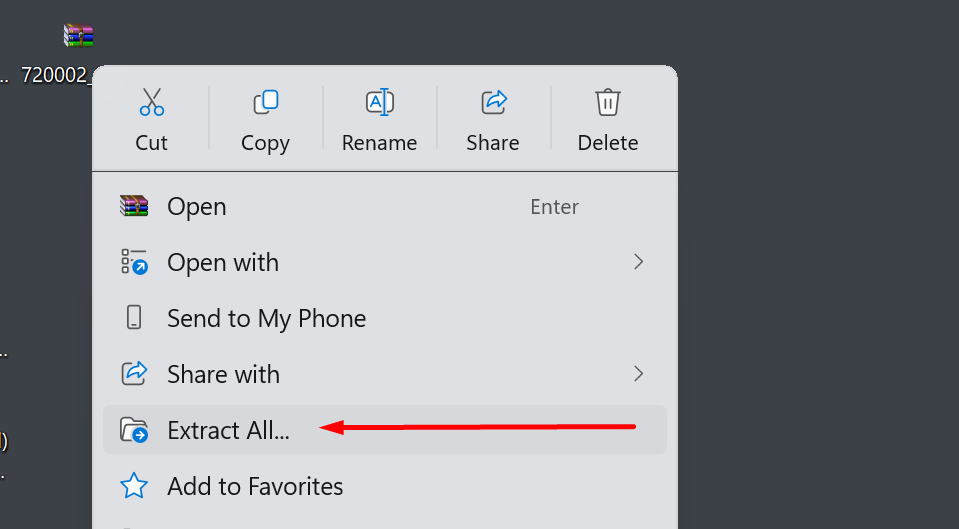
Step 3 — Open the Backtest Report (Optional)
Inside the folder, locate the HTML report file.
Example:
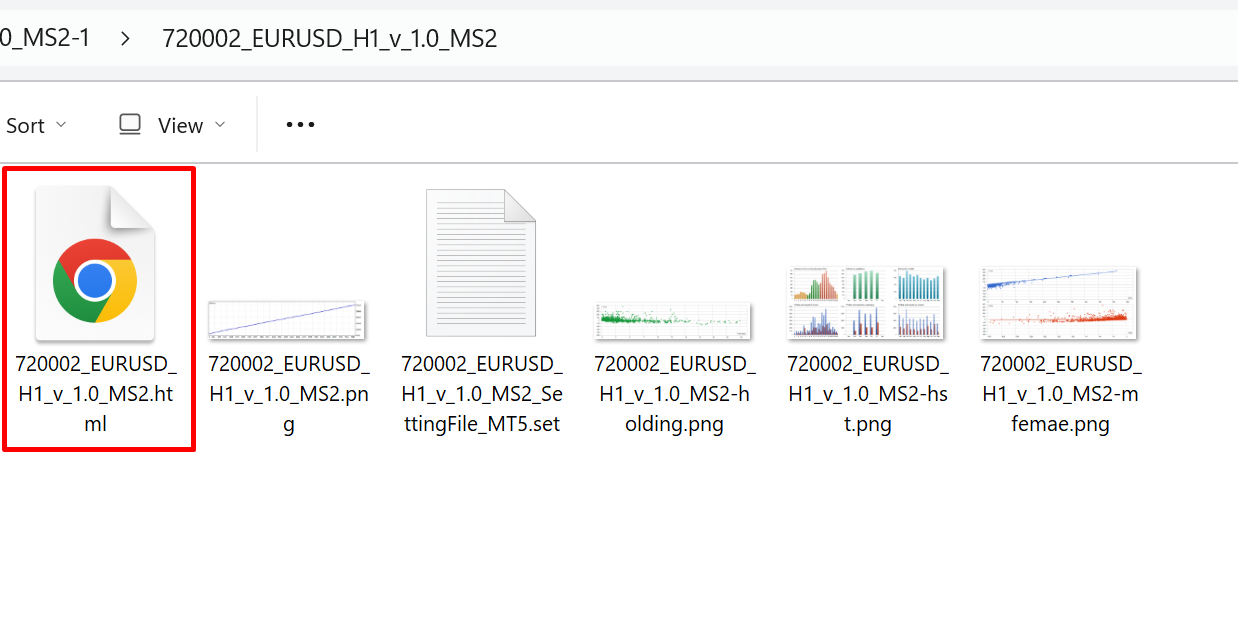
Double-click the file to view the strategy test results in your browser.
Review important information such as:
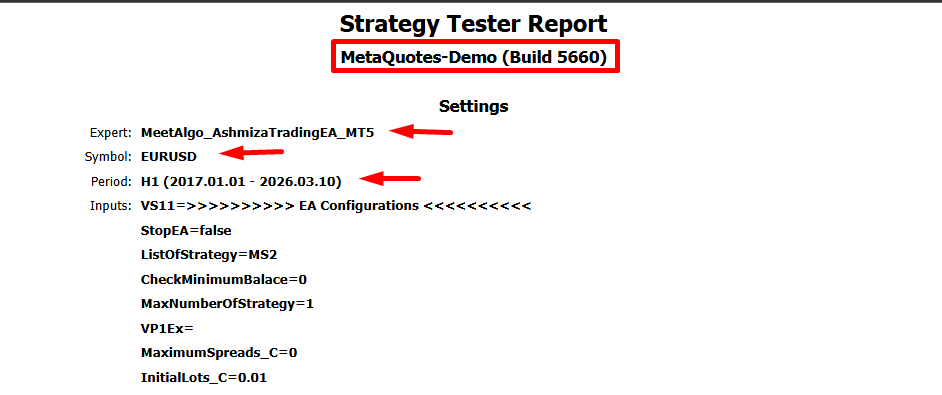
- Broker used
- Testing period
- Timeframe
- Profit
- Drawdown
- Number of trades
Step 4 — Open MetaTrader Strategy Tester
Open your MetaTrader terminal.
Go to the menu:
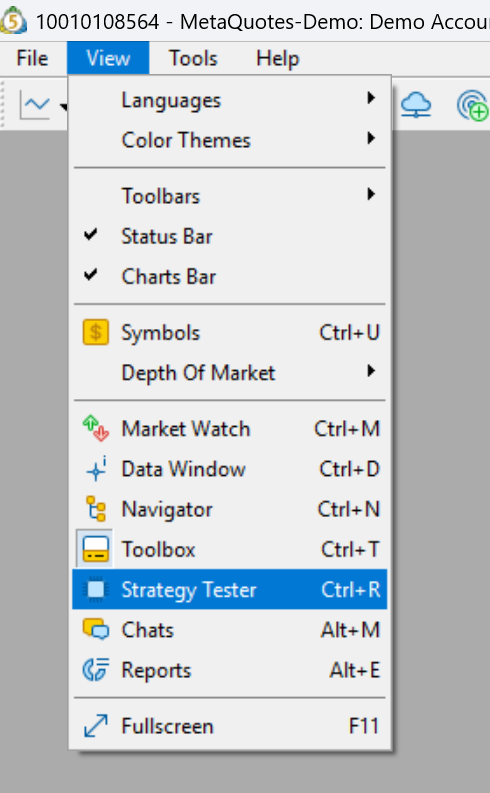
The Strategy Tester panel will open at the bottom of the terminal.
Step 5 — Select the Expert Advisor
In the Strategy Tester:
-
Select the MeetAlgo EA you want to test
-
Select the symbol (pair)
-
Select the timeframe
Make sure these match the configuration shown in the backtest report.
Step 6 — Load the Setting File
Open the Inputs section.
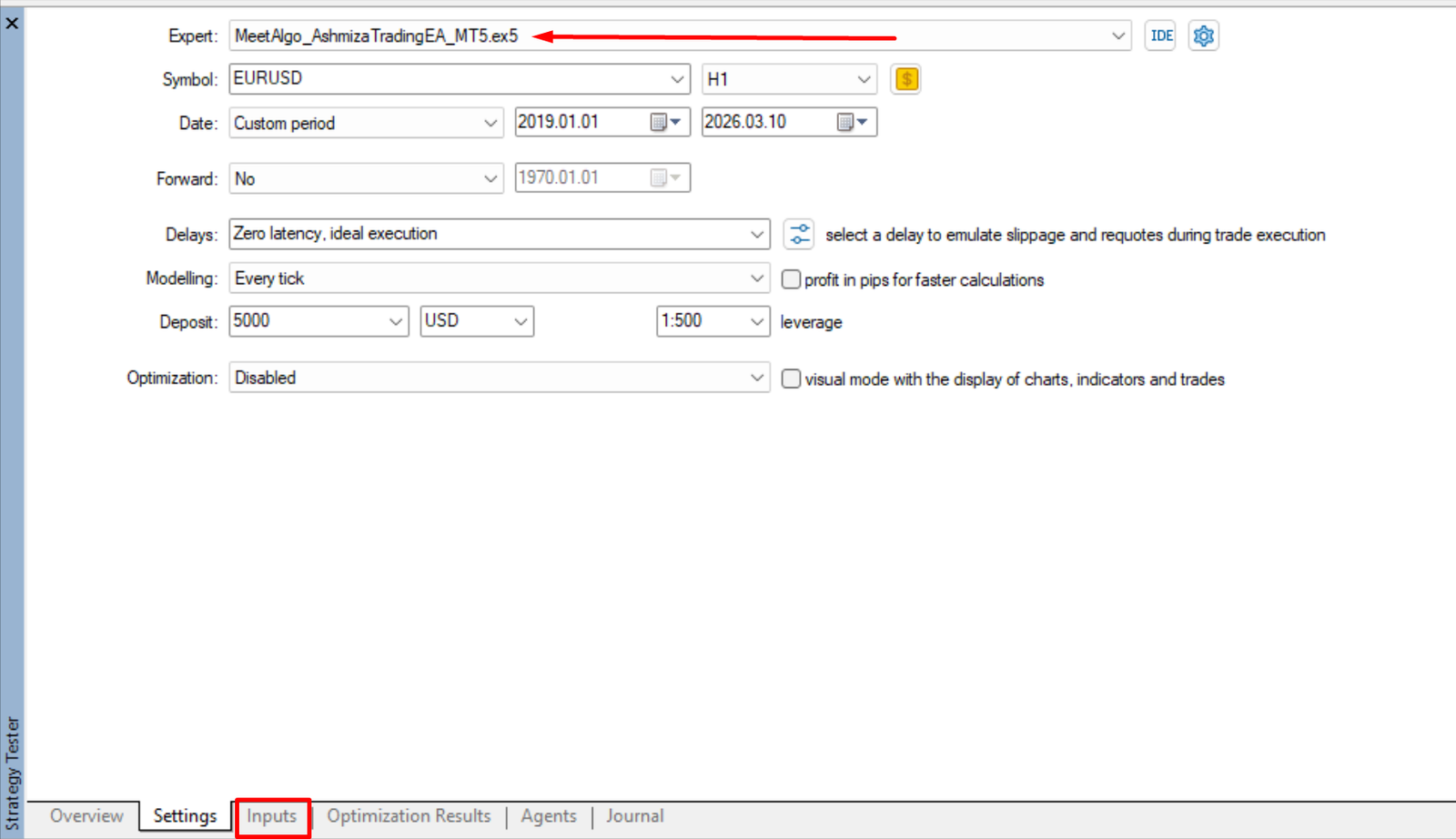
Then:
-
Right-click anywhere in the Inputs area
-
Click Load
-
Browse to the extracted folder
-
Select the setting file
Example:
After loading, all EA parameters will automatically update.
Step 7 — Start the Backtest
Click Start in the Strategy Tester.
MetaTrader will run the test using the loaded configuration.
You can review the results in the:
- Graph tab
- Report tab
- Results tab
Running the EA Live Using a Setting File
If you want to use the configuration for live or demo trading:
Step 1 — Open a Chart
In MetaTrader:
-
Open the symbol chart (for example EURUSD)
-
Select the correct timeframe
Step 2 — Attach the EA
From the Navigator panel:
Drag the MeetAlgo EA onto the chart.
Step 3 — Load the Setting File
In the EA input window:
-
Go to the Inputs tab
-
Right-click
-
Click Load
-
Select the setting file
Example:
Step 4 — Run the EA
Click OK.
The EA will start running using the loaded configuration.
Important Notes About Backtest Results
Backtest results included in the setting file package are provided for research and demonstration purposes only. Actual results may vary depending on several factors.
Please read the following important considerations.
1. Broker and Account Type Differences
Backtest results can vary depending on the broker and account type used.
When MeetAlgo performs backtesting, the results are generated using a specific broker environment. If your broker has different trading conditions, your results may not match exactly.
Important factors that affect results include:
-
Minimum Lot Size
-
StopLevel (Minimum stop distance)
-
Spread
-
Digits / Price Precision
-
Commission Structure
-
Execution model (ECN / Standard accounts)
If these parameters differ from the broker used during testing, the strategy performance may be different.
You can find the broker information used for the test inside the HTML report included in the download package.
Example information available in the report:
-
Broker name
-
Account type
-
Symbol
-
Testing period
-
Timeframe
We recommend running your own backtests using your broker’s data for the most accurate results.
2. Modeling Quality and Historical Data
Backtest results depend heavily on the quality of historical data used during testing.
Different brokers may provide different historical price data, which can influence the results.
Factors that affect modeling quality include:
-
Tick data availability
-
Data gaps
-
Spread simulation
-
Historical price differences between brokers
For best accuracy, we recommend:
-
Using high-quality historical data
-
Running tests with Every Tick mode when possible
3. MetaTrader Version Used for Testing
All MeetAlgo backtests are performed using MetaTrader 5 (MT5).
Most strategy tests are conducted using:
In some cases, tests may be performed using other brokers. The exact broker used will always be shown inside the HTML backtest report file included in the download package.
4. Backtest Results vs Live Trading
Backtesting is a simulation using historical market data.
Actual live trading results may differ due to factors such as:
- market liquidity
- execution delays
- slippage
- spread changes
- broker conditions
MeetAlgo provides these results strictly as software testing examples.
5. MeetAlgo’s Role as a Software Developer
MeetAlgo is a software development company that creates automated trading tools for MetaTrader platforms.
The backtests included with our setting files are performed only in Strategy Tester simulation environments.
MeetAlgo does not operate live trading accounts for public strategy performance reporting, and these results should not be interpreted as live trading records.
Our focus is to provide powerful trading automation tools that allow traders to:
- test strategies
- optimize parameters
- build their own trading systems

