

Global Trade Plan EA v2.3 Released: Important MetaTrader Terminal Update Notice
We recently released Global Trade Plan EA version 2.3, along with updates for several other MeetAlgo EAs.
After the release, some users reported that the new EA version could not load on their MetaTrader chart. We checked the issue and found that the problem is related to the MetaTrader terminal build version.
If your MetaTrader terminal is too old, it may not be able to load an EA compiled with a newer MetaTrader build.
Error Users May See
Some users may see an error like this in the MetaTrader Experts or Journal tab:
MeetAlgo_GlobalTradePlanEA_MT5_V_2.3.ex5 has newer unsupported version, please update your client terminal
The EA may also show:
loading of MeetAlgo_GlobalTradePlanEA_MT5_V_2.3 failed [560]
This does not mean the EA file is broken. It means the terminal build is too old for the new EA version.
Screenshot: Unsupported Version Error

Why This Happens
MetaTrader EAs are compiled for specific MetaTrader platform builds.
When MetaQuotes releases a new platform build, EAs compiled with that newer build may not open correctly in an older terminal. The old terminal does not understand the newer compiled EA format, so it blocks the file and shows an unsupported version error.
Recommended Fix
Please update your MetaTrader terminal to the latest version available from your broker or MetaQuotes.
Basic steps:
- Close MetaTrader.
- Reopen MetaTrader and allow it to update if an update is available.
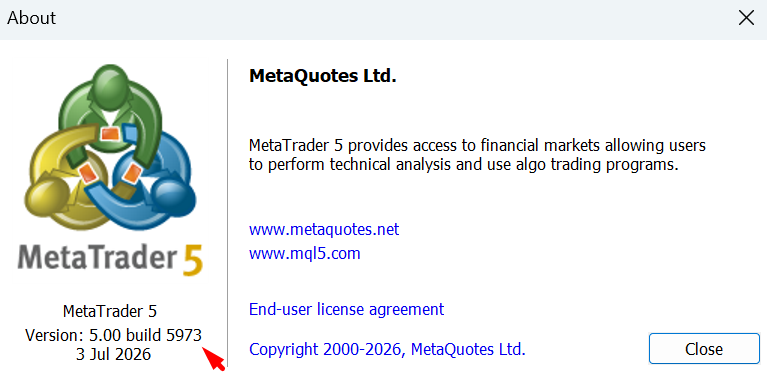
- Check your terminal version from Help > About.
- Install the latest terminal from your broker if your current broker terminal does not update automatically.
- Attach Global Trade Plan EA v2.3 again after the terminal update.
In our latest test, MetaTrader 5 showed:
- Version:
5.00 - Build:
5973 - Date:
3 Jul 2026
Screenshot: Updated MetaTrader 5 Build
If Your Broker Has Not Released the Latest Terminal Yet
Some brokers release MetaTrader updates later than MetaQuotes.
If your broker terminal is still on an older build and does not update, you may need to wait until your broker releases the newer terminal build. Once your broker updates the terminal, you should be able to use the latest EA version normally.
If you cannot update right now, continue using the older compatible EA version until your terminal supports the new build.
Summary
- Global Trade Plan EA v2.3 has been released.
- Several other MeetAlgo EA updates were also released.
- Some older MetaTrader terminals cannot load the new EA build.
- The error is usually a terminal build compatibility issue.
- Update your MetaTrader terminal, or wait for your broker to release the latest terminal update.
For product downloads and updates, log in to your MeetAlgo account:
For support, contact MeetAlgo if the EA still does not load after updating your terminal.

