
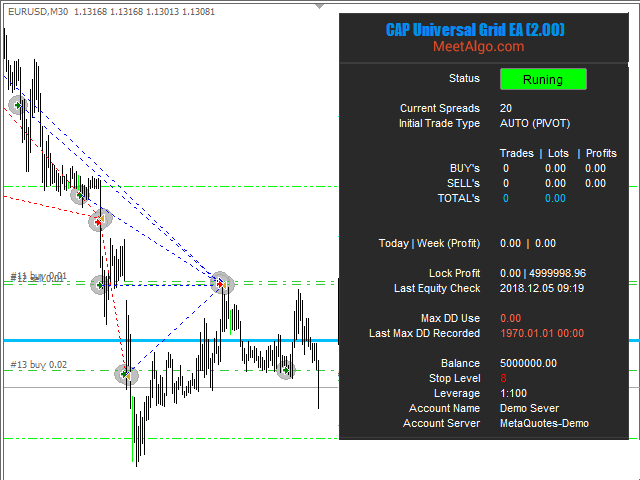
Grid Recovery EA is a highly efficient and mechanical trading strategy that has no reliance on direction, profits from volatility, and uses the intrinsic wavy nature of the market.
- Easy to set up and supervise
- No indicators or hard analysis needed
- Grid trading is time-frame independent
- Requires little forecasting of the market
- Extracts money out of the market regularly
Key Features
- Easy to set up and supervise.
- Function and inputs – the EA comes with a lot of functions and inputs, so you can easily optimize your trading strategy.
- The EA can manage manual trade – the EA can place a grid for your manual trades or you can set the EA to manage trades opened by another EA.
- Built-in automatic trading strategy – the EA can manage your manual trades but you can also set it to fully automatic mode. The EA comes with more than 16+ automatic trading strategies for opening the initial trade.
- Buy and Sell Grid – The EA can manage to buy and sell grids simultaneously.
- Customization capabilities for the future. A unique customization code will be assigned that will perform the relevant customization functions once the code is entered. Options will be controlled by an external file.
- No pending orders are placed – only market orders.
- It works for Forex, CFDs, and futures
Grid trading is a powerful tool, but…
- It can appear complex and illogical initially.
- Like most powerful tools, it is also dangerous.
- Poorly managed grids can cause big drawdowns.
- It requires more patience than regular trading.
- It may require traders to make a paradigm shift.
What is grid trading?
Grid trading has become very popular amongst traders because it does not use stops, is highly mechanical, has no reliance on direction, uses the intrinsic wavy nature of the market, does not require indicators or charts to trade, and can be easily automated. Grid trading refers to the trading approach which uses fixed price levels to enter and exit trades. A grid is nothing more than a single deal or position segmented into several trades, which are cashed out independently from each other at regular intervals.
Changelog
Version 8.5 – 2026-03-01
FIXED BUGS: In version 8.4, when Pivot Points were activated, the EA continuously printed messages in the Experts tab. This issue has been fixed and logging now works correctly.
Version 8.4 – 2026-02-03
FIXED BUGS: Restored missing inputs in the Profit Grid section. The following inputs are now properly available and working:
• Grid GAPs In Percentage [BUY]
• Grid GAPs In Percentage [SELL]
UPDATED: Enhanced the Auto Trading Pivot Points Strategy.
• Added more pivot levels for entry opportunities.
• Introduced new options to enable or disable specific pivot lines, giving you full control over which levels the EA trades.
Version 8.2 – 2026-01-15
FIXED BUGS: Fixed an issue where the Auto Trading Pivot entry logic was not functioning as expected. This logic has now been corrected and works properly.
Version 8.0 – 2025.10.16
UPDATED: Inputs reorganized and grouped by section for better clarity and usability.
ADDED: NEW FEATURE Introduced a new grid type: In Percentage – grid gap is now calculated as a percentage of the opening price.
ADDED: GRID DD REDUCTION This version adds a Grid DD Reduction mechanism — when enabled, the EA will close trades based on a combination of the last profit trade and the first losing trade to reduce drawdown.
ADDED: TRADE FILTER New option Don't Open if Grid Trade Already Exist – when enabled, the EA will skip opening a new grid trade if another trade already exists at that level. Useful when using both Buy and Sell directions to avoid duplicate grid entries.
Version 7.3Â 2024.05.25
FIXED BUGS: From the previous week the news filter stopped working. In this version add a new input 'News URL' where there are different URLs of the news filter. You can select a news URL that works with you. There are three news source URLs -
https: // ec.forexprostools.com
https: // sslecal2.investing.com
https: // sslecal2.forexprostools.com
Keep IN MIND - If you select any news URL, you have to add the URL into Allow 'WebRequest for listed URL'
Version 7.2Â 2024.04.04
UPDATED: Minor Update, Internal coding change, Build with new compiler.
Version 7.1Â 2024.01.10
ADDED: NEW INPUT –
---> Check Market Close- Set it true if your EA is stuck in backtest for the "open trade when market closed" message. This only happened to some brokers and in backtest only. You don't need set true for live trading.
Version 7.0Â 2023.04.02
FIXED BUGS: The news filter not working, we fixed this issue. Please Add a new link to Terminal Options. The new link will be shown by EA
Version 6.9Â 2022.07.15
ADDED: NEW FEATURE – Add "Currency in Profit (Bothside) and Currency in Loss (Bothside)