
MeetAlgo.com
  • Library
  • Tools
    • Settings File
    • MT5 Result Cache
    • Live Result
  • Trading
    • Forex Broker
    • Forex VPS
  • Affiliate
  • Resources
    • Changelog
    • Documentation
    • Blog
    • Contact Us
Login / Register
0 items $0
Get Membership
Menu
MeetAlgo.com
0 items $0
Membership
Zone Recovery Panel EA
Robot · v1.4

Zone Recovery Panel EA

Zone Recovery EA uses smart hedging to recover losses—turns bad trades into winners with the “Never Lose Again” method.

$99
Clear
Available for Members Only
Download File
Login to Download File
Verify to Download File
Download File
Login to Download File
Verify to Download File
User Guide
*

Or get this plus the full product library with Lifetime Membership - $799. Save $2,999+.

Get with Membership
  • Instant download
  • Secure checkout
  • 15 activations
Before You Buy
How to Test Before Purchase Run the EA on demo or backtest mode before you commit.
How to Purchase Step-by-step checkout, payment, and instant delivery.
How Licensing Works Account activation, transfers, and license slot management.
Activations15
Current version1.4
Published06/30/2020
Updated01/13/2026
User Guide
Product Documentation

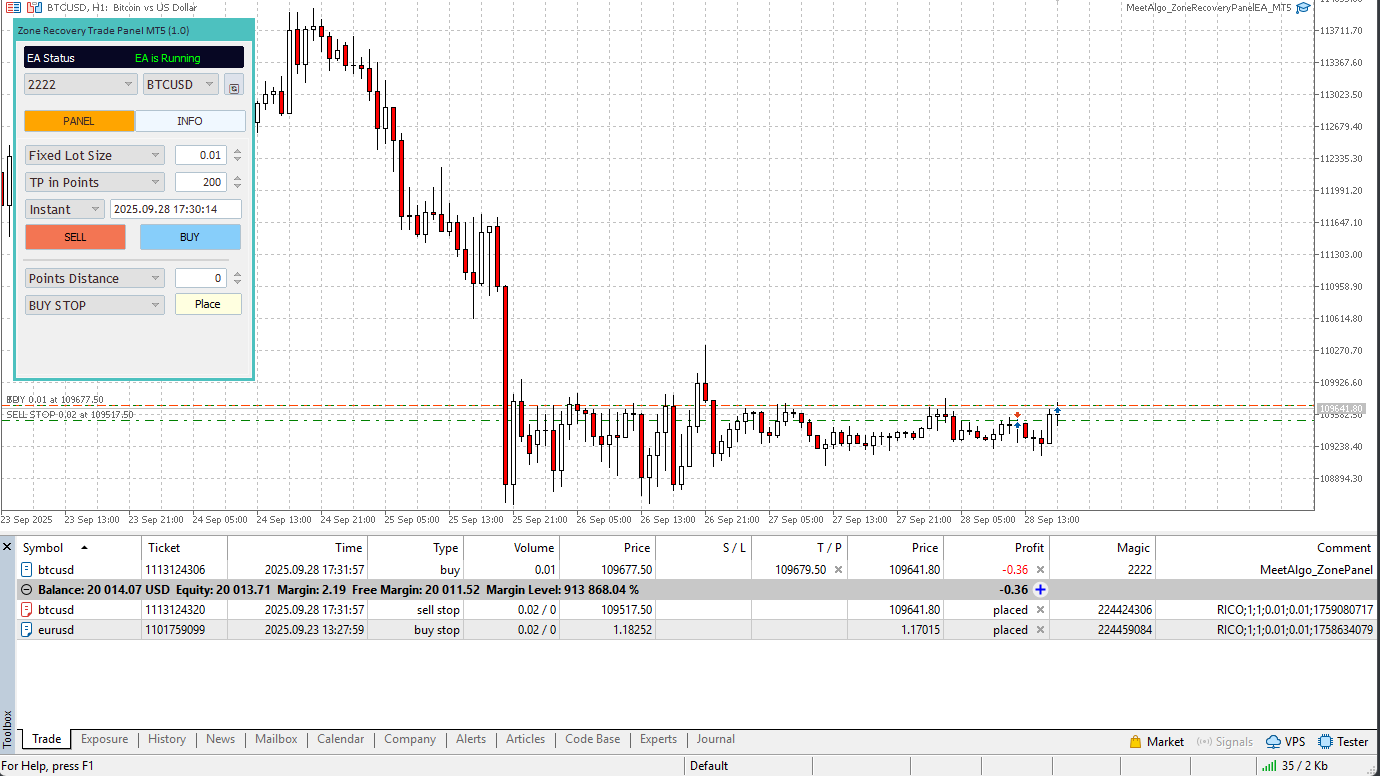
MeetAlgo Zone Recovery Panel EA  is a powerful new product built on top of our flagship Zone Recovery System, combining the ease of a chart-based trading panel with the intelligence of individual trade management. While it shares the same recovery engine as Zone Recovery EA PRO and Zone Recovery Manual EA, this version offers something completely unique: a multi-pair, panel-based manual trading experience with per-trade recovery control — all from one interface.
 What’s New in This Version?

  • Built-in Chart Panel: Easily open BUY, SELL, or Pending orders using a clean, responsive on-chart panel — no need to manually place trades through MT5’s native interface.
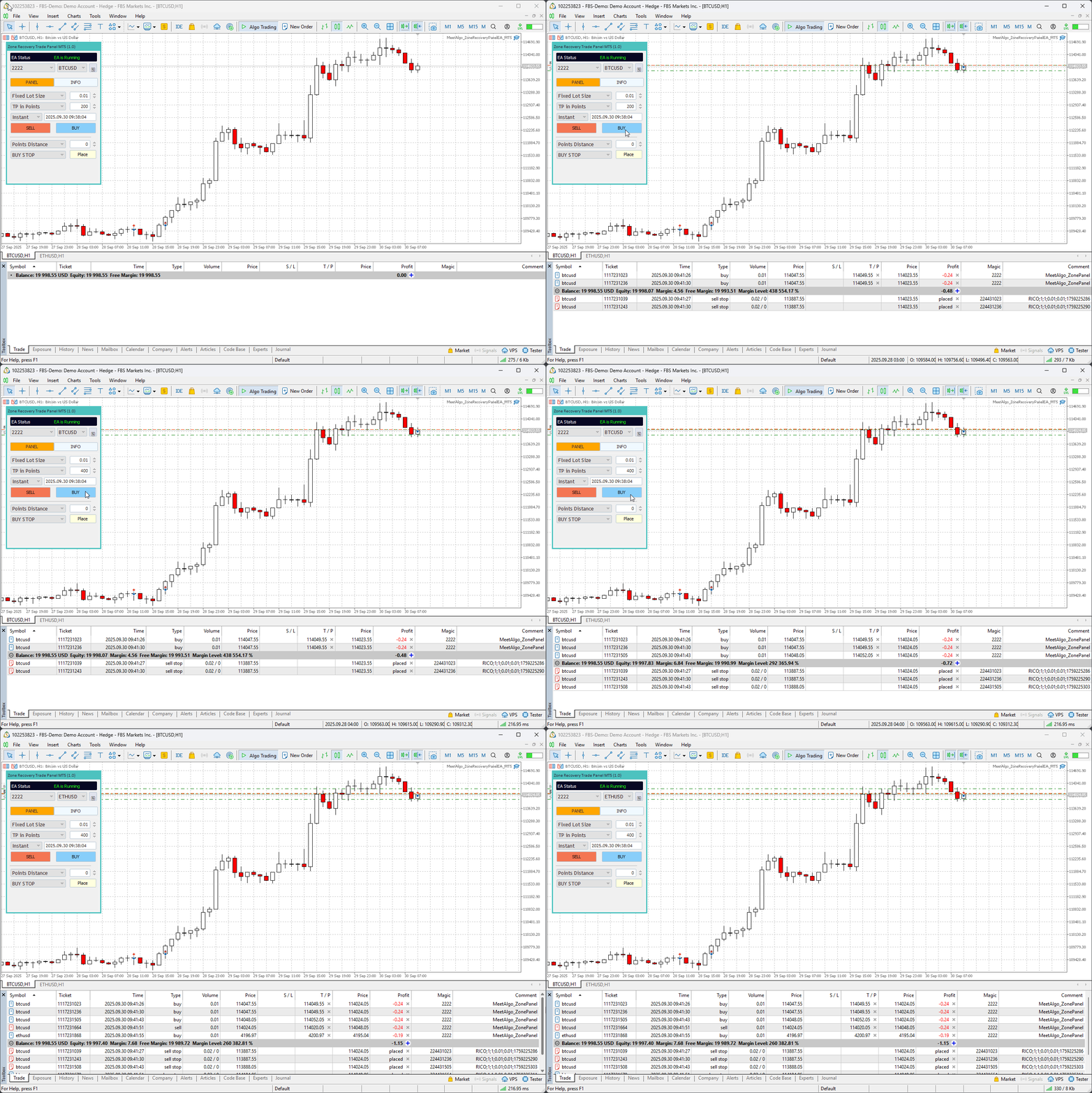
  • Multi-Pair Trading Support: You can place and manage trades across multiple symbols from a single chart. Just enable multi-pair mode and select your desired pair from the panel dropdown.
  • Magic Number Control: The panel allows you to select from multiple Magic Numbers, so you can manage trades with different recovery profiles independently.
  • Per-Trade Recovery System: Every trade opened through the panel is managed individually using our proven Zone Recovery Algorithm — even across different pairs or magic numbers.

What is Zone Recovery Trading?

Zone Recovery is a professional-grade hedging strategy, often referred to as the Surefire Forex Hedging System. When a trade goes into drawdown, the system does not close it in loss. Instead, it opens an opposite direction trade at a predefined distance with a calculated lot multiplier. This creates a price zone where profits can be locked in regardless of whether the market moves up or down. Once the Take Profit of the total position is reached, all trades are closed — in net profit.

How the Panel Works?

  1. Launch the EA on any chart and select your desired Magic Number and Symbol.
  2. Set your preferred lot size, Take Profit, and order type (instant or pending).
  3. Open trades directly from the panel using the BUY, SELL, or Pending Order buttons.
  4. The EA will manage each trade individually — applying its recovery logic only to that trade — even across different pairs and different Magic Numbers.

“Whether the price moves up or down — you win either way!”

Key Benefits

  • Panel-based manual trading for quick execution
  • Individually managed recovery per trade, across any pair
  • Supports Multi-Magic + Multi-Pair logic
  • No Stop Loss required — smart recovery replaces it
  • Advanced features: Take Profit, Recovery Gap, Lot Multiplier, Break Even, Trailing Stop
  • Works with Forex, CFDs, Indices, Crypto, and more

Who is it for?

  • Traders who prefer manual trading but want recovery automation
  • Scalpers and short-term traders managing multiple pairs
  • Traders who want an intuitive panel UI to execute and manage risk
  • Anyone already using the Zone Recovery system and looking for a visual interface

Requirements

  • Only works with trades opened through the panel
  • Ensure hedging is enabled on your broker account
  • Sufficient margin is required to handle recovery positions
  • Recommended for Hedging accounts only

User Guide

  • Details User Guide

List MeetAlgo Zone Recovery EA Series

1. MeetAlgo Zone Recovery EA PRO

  • Our main product.
  • Can manage manual trades, external EA trades, and includes a built-in trade panel.
  • Supports auto trading strategies like RSI, MA, BB, and more.
  • Best for traders who want both manual and semi-automated recovery management.

2. MeetAlgo Zone Recovery EA Builder

  • Designed only for auto trading.
  • Does not manage manual or external trades.
  • Comes with 34+ built-in indicators (MA, RSI, ADX, MACD, etc.) to build and optimize your own recovery strategy.
  • Ideal for strategy developers and optimization-focused traders.

3. MeetAlgo Zone Recovery Manual EA

  • Built specifically to manage manual trades only.
  • Unlike the PRO version, it manages each trade individually, even if multiple manual trades are open on the same symbol.
  • No panel or auto-strategy included — purely manual trade management with advanced recovery logic.

More Details-

Changelog

Version 1.4 – 2026.01.13
FIXED BUGS: Fixed an issue where the panel would duplicate or freeze when loaded via a template. This issue has been resolved for smoother operation.
UPDATED: Improved the Info Panel display to correctly show:

  • Number of Open Initial Trades
  • Number of Hedge Trades
  • Last Cycle Information

Unlock Unlimited Access
to the MeetAlgo Library

Upgrade to Lifetime Membership to get every EA, indicator, and optimized setting file, plus all future releases free.

Unlock now ->

We are a Financial Technology company offering cutting edge trading software, software development service and free online education.

trustpilot-logo-trustpilot-logo-png-1
See our 45 reviews on
Trustpilot
Customer
  • Dashboard
  • Orders
  • Downloads
  • Serial Keys
  • Refund Policy
PRODUCT
  • Membership
  • Trading Software
  • Our Shop
SERVICES
  • MT5 Programing
  • MT4 Programing
  • cTrader Development
  • NinjaTrader Programming
  • Request A Quote
INFO
  • About Us
  • Contact Us
  • Our Affiliate Program
  • Documentation
  • Blog
  • Join Our Newsletter
Disclaimer

MeetAlgo LLC is a software development company specializing in building trading tools and indicators for MetaTrader 4 (MT4), MetaTrader 5 (MT5), cTrader, and NinjaTrader platforms. We are not a broker and do not offer investment or trading advice. All tools, Expert Advisors (EAs), and indicators provided by MeetAlgo are strictly for informational and educational purposes only and should not be interpreted as financial advice.

MetaTrader® is a registered trademark of MetaQuotes Ltd. cTrader® is a registered trademark of Spotware Systems Ltd. NinjaTrader® is a registered trademark of NinjaTrader Group, LLC. None of these companies are affiliated with MeetAlgo LLC, nor do they endorse or approve any of our products or services.

All strategies, charts, backtests, and examples shown on our website are for demonstration purposes only and reflect hypothetical performance. Past performance does not guarantee future results.

Risk Warning

Trading financial instruments such as forex, CFDs, and futures carries a high level of risk and may not be suitable for all investors. You could lose more than your initial investment. Approximately 74–89% of retail traders lose money when trading CFDs. You should only trade with capital you can afford to lose.

MeetAlgo LLC does not provide financial, investment, or brokerage services. Before using any of our tools, please ensure you fully understand the risks involved in trading and consider seeking independent financial advice if necessary.

Use of our website and software implies acceptance of our terms and conditions and acknowledgement of these risks.

MEETALGO LLC 2021, All rights reserved.

  • Privacy Policy
  • Risk Disclosure
  • Terms & Conditions
  • Cookie Policy
  • Library
  • Tools
    • Settings File
    • MT5 Result Cache
    • Live Result
  • Trading
    • Forex Broker
    • Forex VPS
  • Affiliate
  • Resources
    • Changelog
    • Documentation
    • Blog
    • Contact Us
Shopping cart
Close
Sign in
Close

Lost your password?

No account yet?

Create an Account
Shop
Services
0 items Cart
My account