

Our trading tools were removed from the MQL5 Market on October 2, and we can no longer access customer messages, purchase history, or send updates through their platform.
If you previously purchased any MeetAlgo EA or indicator on MQL5, we want to ensure you still receive updates, support, and access to our latest versions.
Why Verification Is Required
MQL5 does not provide customer details or purchase records to developers.
To reconnect with our old customers, we need to verify each purchase manually.
This process helps us:
- Confirm that you previously bought our product on MQL5
- Provide you with a new license in our official system
- Offer a special migration discount (for verified MQL5 customers only)
- Ensure you continue receiving lifetime updates
How the Migration Program Works
Fill out the form with your details
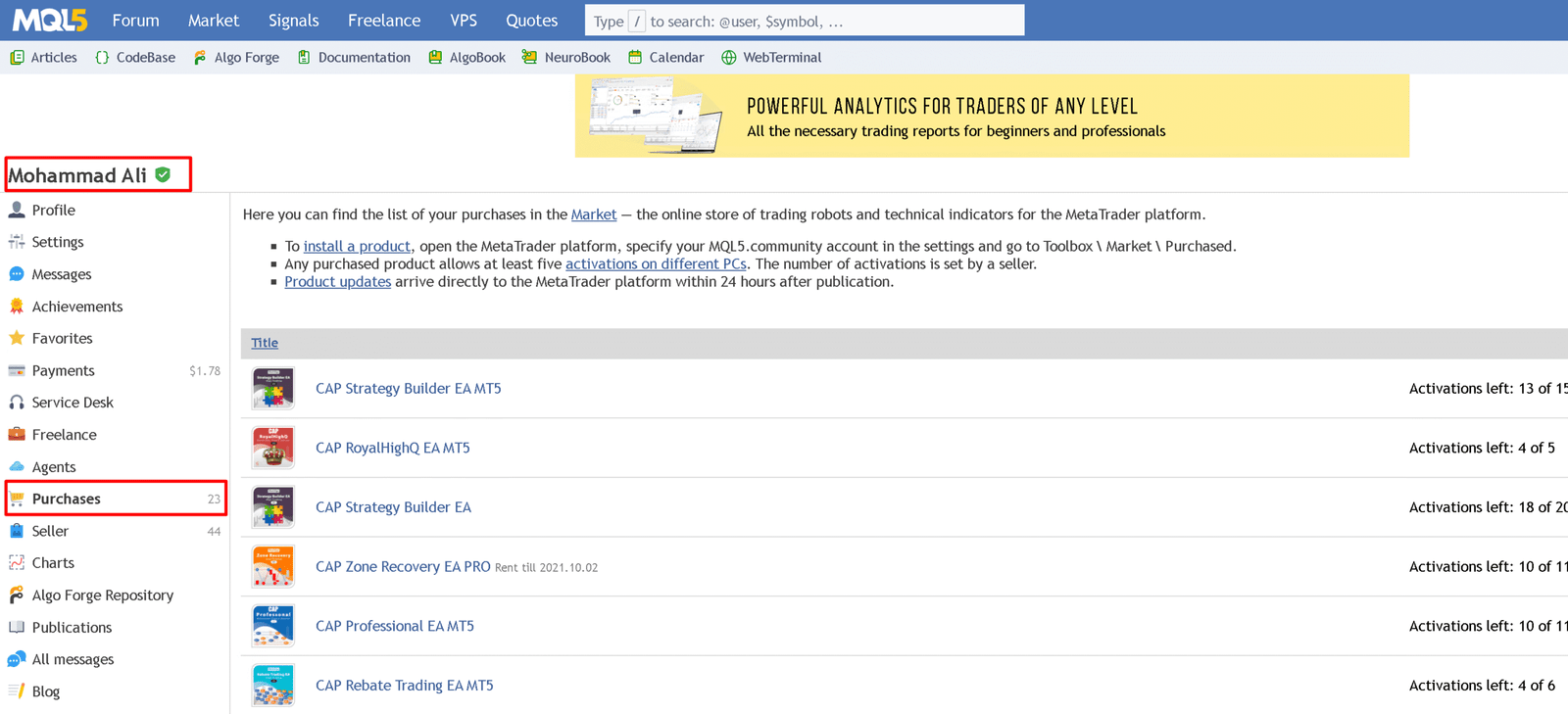
Upload a screenshot of your MQL5 Purchases page (showing your username + product)

Our team verifies your purchase
You receive your exclusive migration discount to re-purchase the tool on our website
Once purchased, you get:
✔ Lifetime updates
✔ Lifetime support
✔ Access through our official licensing system
Your original MQL5 purchase remains valid inside the MQL5 platform, but cannot be transferred to our website due to licensing differences.
Why Join the Migration Program
By reconnecting with us through this program, you will:
- Receive all future updates
- Get full access through our website
- Stay independent from MQL5 marketplace rules
- Continue receiving support directly from the MeetAlgo team
Start Your Migration Request Below
Please complete the form and upload your purchase screenshot.
We will verify your request within 24–48 hours.

