
Charts are hypothetical Strategy Tester backtests unless marked as live results. Past performance does not guarantee future results.
Zone Recovery Builder EA
Zone Recovery Builder EA combines strategy building (34+ indicators) with zone recovery—create & test without coding.
- Instant download
- Secure checkout
- 15 activations
MeetAlgo Zone Recovery Builder EA is another combine version of our Main Product MeetAlgo Zone Recovery EA and MeetAlgo Strategy Builder EA. This EA is a strategy builder type EA with more than 34+ built-in indicators that you can make more than 1 million combination strategies that boost your trading strategy. Also, this Builder offers an incredible amount of functionality with a zone recovery strategy. So you can test your strategy easily without knowledge of coding.
What is a Zone Recovery Strategy?
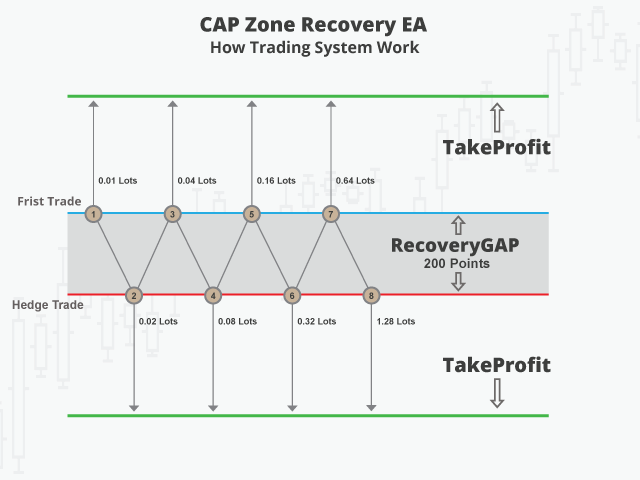
Zone Recovery manages a losing trade with a “back-and-forth” hedging method known as the Zone Recovery algorithm. Instead of closing the trade at a Stop Loss, the EA opens opposite trades with larger lot sizes inside a fixed price zone and tries to close the whole group of trades at a combined profit.
How it works. A trade opens from your built strategy or manually, with a Take Profit. If price moves against it by the Recovery Gap, the EA opens an opposite trade with a larger lot size. If price turns again, the same step repeats. The result is a “trading channel” with an upper and a lower Take Profit level and a series of buy and sell trades inside it. When either Take Profit level is reached, all open trades of the cycle close together.
Example: a buy of 0.01 lots with RecoveryGAP = 200 points and TakeProfit = 300 points. Instead of a Stop Loss, the EA places a pending sell stop order 200 points below the entry. Two scenarios are possible:
- Scenario 1: Price rises and hits the Take Profit before reaching the recovery level. The trade closes in profit.
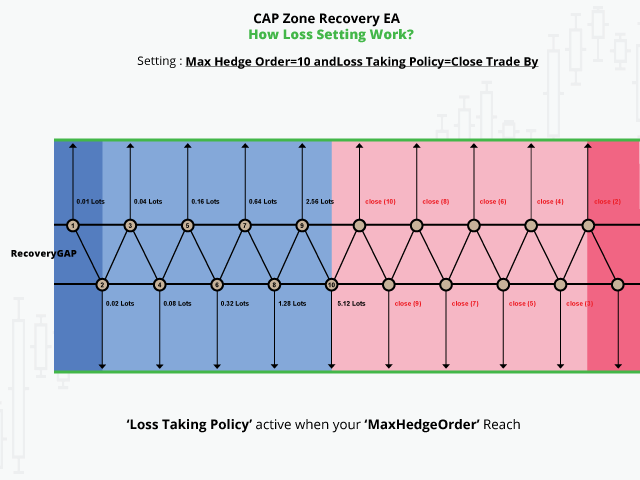
- Scenario 2: Price falls to the recovery level. An opposite trade with a larger lot size opens, a new combined Take Profit is set for all trades, and the cycle continues until one Take Profit level is hit or your loss settings close the cycle.
Key Features
- Easy to set up and supervise.
- Build in Automatic trading strategy. EA can manage your manual but also you can set full automatic. EA come with more then 16+ automatic trading strategy to open your initial trade.
- Break Event and Trailing. Break event or Trailing can be work both initial trade and hedge trade.
- Can be work on CDF, INDEX or Brazilian stock market
- Customization capabilities for future. A unique customization code will be assigned that will perform the relevant customization functions once the code is entered. Options will be controlled by an external file.
Advantages:
- Recovery cycle inside a defined price zone with one combined Take Profit
- Initial trade with TP, Trailing Stop and Break Even functionality
- Hedging mechanism instead of Stop Loss
- Multiple lot sizing (more intelligent than simple martingale system)
- Intelligent lot sizing
How To Trade
No complicated rules, EA Just follow 5 simple steps!
- Step 1: Setup Initial Trade Type – Setup your initial trade type. how your first trade will be open.
- Step 2: Active/Disable Grid Setup – If your enable grid then your initial trade in Loss then EA try to make profit by grid trading. But still your trade in loss then EA active “Zone Recovery Strategy”, It is optional.
- Step 3: Configure your Recovery Trade Setting – If your initial trade + grid trade are not make profit, then EA activates the “Zone Recovery Strategy”, which tries to close the losing trade group at a combined profit
- Step 4: Non-Hedge Mode
- Step 5: Configure Loss Taking Policy – If your initial trade + grid trade are not make profit, and also your “Zone Recovery Strategy” fail to make profit, then EA active Loss Trading Policy
Pay attention to:
- Select broker with best commissions and slippage
- Avoid ranging markets! Look for trending markets!
- Avoid off-hours or lower volatility sessions
- Choose initial lot sizing carefully! Avoid running out of free margin after some market turns!
MeetAlgo Zone Recovery EA Series
1. MeetAlgo Zone Recovery EA PRO
- Our main product.
- Can manage manual trades, external EA trades, and includes a built-in trade panel.
- Supports auto trading strategies like RSI, MA, BB, and more.
- Best for traders who want both manual and semi-automated recovery management.
2. MeetAlgo Zone Recovery EA Builder
- Designed only for auto trading.
- Does not manage manual or external trades.
- Comes with 34+ built-in indicators (MA, RSI, ADX, MACD, etc.) to build and optimize your own recovery strategy.
- Ideal for strategy developers and optimization-focused traders.
3. MeetAlgo Zone Recovery Manual EA
- Built specifically to manage manual trades only.
- Unlike the PRO version, it manages each trade individually, even if multiple manual trades are open on the same symbol.
- No panel or auto-strategy included — purely manual trade management with advanced recovery logic.
Version 3.12 – 2026-09-20
UPDATED: Compiled with our new online Membership activation system.
Version 3.11 – 2026-08-01
FIXED BUGS: Some new Membership Plan accounts were not working correctly with the old EA version. This issue has been fixed.
Version 3.10 – 2026-07-29
UPDATED: Activation name validation has been updated. Customers should now enter only the real account owner name, without broker prefixes or suffixes. For example, if MT4/MT5 shows 'Tickmill - Veronica - CAD 001', enter 'Veronica'. Account number, product, account type, and expiry checks remain unchanged.
Version 3.9 – 2026-07-24
UPDATED: This EA is now compatible with the new activation system. Old keys still work, but users need to upload their key from the activation dashboard.
Version 3.8 – 2026-07-06
FIXED BUGS: The previous version was built with MT5 build 5975, which many brokers are not using yet. This caused compatibility issues on older terminal builds.
UPDATED: Rebuilt the EA with an older compatible build so users can continue using it on broker terminals that have not updated yet.
Version 3.7 – 2026-07-04
UPDATED: Product compiled with the new build. Update the terminal if needed to work with this EA version.
UPDATED: This version is compatible with the new Membership Plan and also works with the old Membership Plan.
UPDATED: Other functions remain unchanged.
📅 Update 3.6 – 2025.11.30
FIXED BUGS: Resolved an issue where the EA dashboard turned black or showed no information in MT5. This bug was caused by changes in recent MT5 builds and is now fully fixed.
Version 3.5 – 2025.11.12
FIXED BUGS: Resolved an issue where the dashboard appeared blank and did not display any text in the latest MT5 builds.
FIXED BUGS (MAJOR): Fixed a critical issue in Non-Hedge Mode where the EA would stop trading due to failure in closing previous hedge trades. This logic error has been resolved to ensure continuous and reliable trading in Non-Hedge Mode.
Version 3.4 2025.01.14
FIXED BUGS: MT4 version can't work with membership serial key
Version 3.3 2024.11.09
FIXED BUGS: Serial Key not working with premium membership, Fixed this issue

